Photos & menus
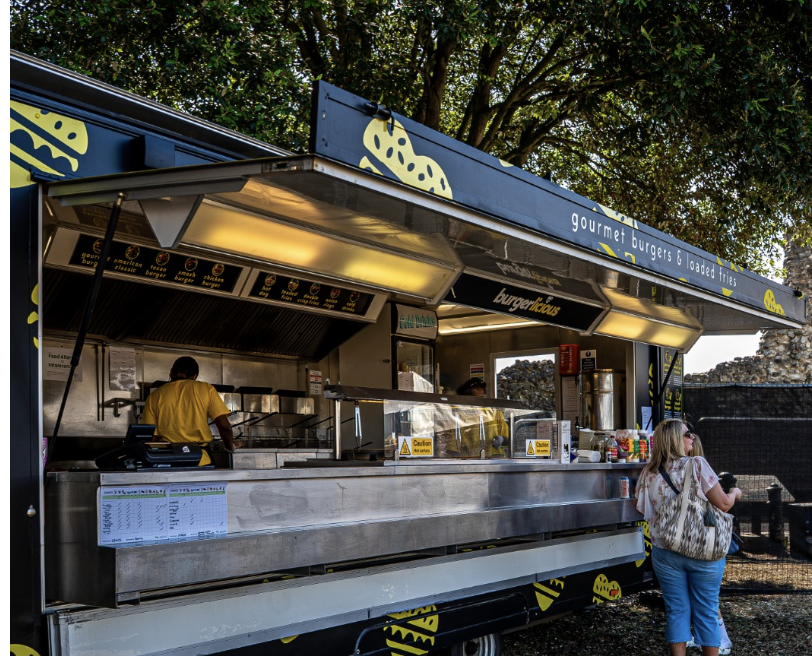
See the frontage and current menu alongside the application. Review the products, pricing and service setup, not just a company name.
For event organisers
The right mix starts with a clear view of every trader. Halo uses TraderPitch to bring the food, physical units, event decisions and operational checks into one workflow.
Looking for a pitch for your own business? Start with our trader guide.
Selection with the detail in view
Use menus, food categories, dietary options and unit presentation to review the mix. Keep the decision attached to the actual unit and the actual event.
See the frontage and current menu alongside the application. Review the products, pricing and service setup, not just a company name.
Filter applications by event, food or trade category and stage. Keep separate dates distinct and identify where the line-up needs another option.
Shortlist the units that fit. A company can have several applications, with different units and decisions at each event.
Beyond the shortlist
A promising application is only the beginning. Keep the commercial decision separate from the practical checks needed to confirm a stall.
Issue an itemised offer for the selected units and pitches. The trader signs first; an authorised admin then creates the payment request.
Review unit dimensions, towbar, extra equipment, support vehicles, back-of-house space and power needs before final allocation.
Track compliance evidence and staff hygiene certificates. OCR suggestions wait for human review; an upload is not automatic approval.
A useful 360 view
Company, unit and event views each answer a different question. Clear menus keep the next action close without showing every detail at once.
Start a conversation
Share the brief so the team can discuss the right next step. Sending an enquiry does not book traders or confirm a price.
Already part of the Halo team? Open the admin workspace.
Opens your email app. Nothing is sent until you send the email. You can also write directly to traders@halo-halo.co.uk.